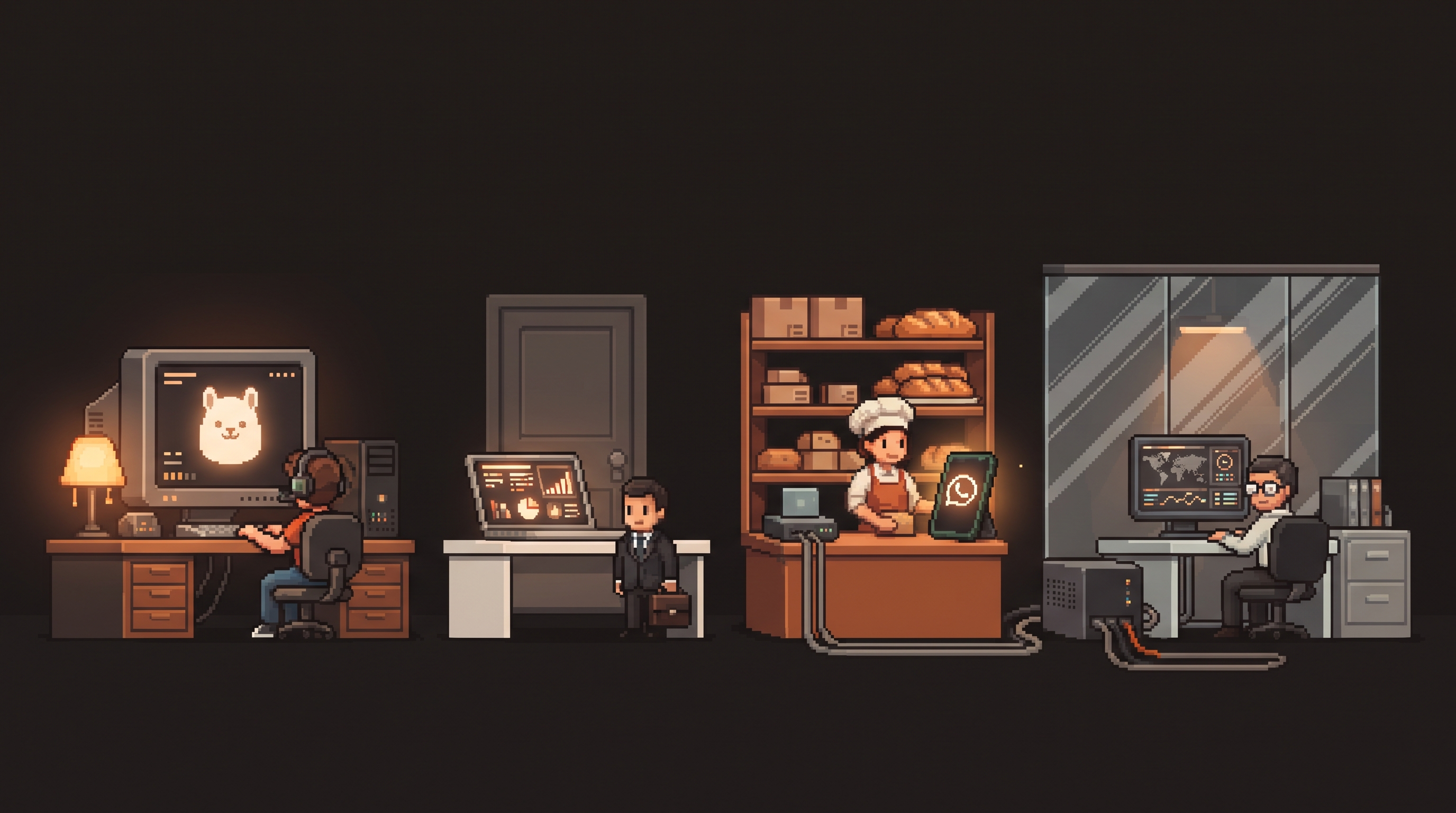
Four people sit down to build their first local AI setup: a YouTuber, a marketing consultant, a bakery owner, and an analyst inside a 5,000-person company. All four download the same software — Ollama, n8n, a model file. Within a month, their setups look nothing alike. Not because the tools differ, but because their jobs quietly answer four different questions: where does the AI actually run, and what is it allowed to touch?
Most "match the automation to your job" advice stops at which workflow to build first. That's the easy half. The decision that actually shapes everything after it — the hardware you buy, the model sizes you can use, what data the system ever sees — is deployment. Get that wrong for your role and you end up with either an expensive machine that idles 23 hours a day or a "free" setup that leaks exactly the data your role exists to protect.
Local AI deployment should match your work role's constraints, not your ambition. A creator runs an on-demand content engine on one powerful desk machine. A marketer keeps client data behind a strict boundary and runs small fast models on the work laptop. A small business owner needs an always-on mini server (an old laptop works) for n8n ops automations. A corporate specialist needs an IT-approved departmental box doing retrieval over internal documents. Same software, four deployment shapes — each defined by uptime needs, model size, and the data that must never leave the machine.
Why Deployment Is the Real First Decision
A local AI stack has three physical knobs, and every role turns them differently:
- Uptime — does the system answer in seconds at 9 a.m. Monday, or only when you boot it?
- Model size — an 8B model writes decent drafts; a 70B model reasons like a colleague. Size decides hardware.
- Data boundary — what is this machine never allowed to send anywhere?
The roles differ most on that third knob. A creator's drafts are tomorrow's public posts anyway. A consultant's client files are contractually private. A corporate department's documents are behind compliance rules. Same software stack; completely different trust boundaries.
The Creator: One Powerful Desk, On Demand
The creator's product is volume with a voice. The machine's job: turn one idea into five formats before the coffee gets cold.
- Shape: one powerful desk computer, switched on when working. No 24/7 needed — creators don't lose money when the AI sleeps.
- Model size: the biggest that fits the budget. Writing quality tracks model size more than any other job here.
- Boundary: almost none. Drafts become public anyway, which makes this the safest role to experiment boldly.
# creator picks: quality first, latency second
ollama pull llama3.2          # fast drafts, repurposing
ollama pull qwen2.5:14b       # long-form writing where VRAM allows
ollama run qwen2.5:14b "turn this outline into a 400-word script"
The creator's trap is the opposite of everyone else's: buying too little machine, then blaming "local AI" for drafts that read like a translation of a translation. For this one role, spend the money.
The Marketer: Client Data Behind a Wall
The marketer's constraint is contractual. Client briefs, campaign numbers, audience exports — all of it lives under NDAs, and pasting it into a cloud chat is exactly what the NDA said not to do.
- Shape: the work laptop itself. Portability matters; the boundary travels with the machine.
- Model size: small and fast. Summarizing a 40-page brief doesn't need 70B parameters — it needs to happen offline, right now.
- Boundary: absolute, and it's the selling point. "Your data never leaves my machine" is a sentence that wins clients.
FROM llama3.2
SYSTEM """
You process client documents offline. Rules:
- Summarize, extract, and structure only what is in the provided text.
- Never suggest sending client material to external services.
- Flag any personally identifying data you find before summarizing.
"""
One Modelfile per client keeps contexts clean and makes the privacy story auditable — you can literally show which model folder saw which client.
The Owner: The Always-On Mini Server
The bakery owner doesn't need a writing genius. They need a tireless clerk: orders acknowledged at 6 a.m., invoices chased on Fridays, WhatsApp answered while hands are in flour. Ops automations only pay off when the machine never sleeps.
- Shape: an old laptop or a mini-PC in a corner. Modest specs are fine — ops tasks are small-model work.
- Model size: 3B–8B. Triage, replies, tagging. That's the job.
- Boundary: customer PII stays in-house by default — which is also just good practice once you're the one holding it.
workflow: bakery-ops
schedule: "*/10 * * * *"
nodes:
  - name: read-whatsapp
    type: whatsapp-trigger
    events: ["message"]
  - name: triage
    type: http-request
    url: "http://localhost:11434/api/generate"
    body: { model: "llama3.2", stream: false,
            prompt: "Classify: order|question|complaint. Reply warmly in one sentence: {{message}}" }
  - name: route
    type: switch
    rules: "order -> order sheet; complaint -> phone alert; question -> auto-reply"
  - name: friday-invoices
    type: schedule-cron
    cron: "0 9 * * 5"
    action: "chase unpaid invoices via template"
Uptime is the entire game here. A brilliant automation that only runs when the owner remembers to boot a computer is a hobby; the same flow on a $50-used-laptop in a corner is a staff member.
The Corporate Specialist: The Departmental Box
The analyst inside a big company has the least freedom and the biggest unlock. Cloud AI is often banned outright — so the first compliant AI in the building is the one that never packets data past the lobby.
- Shape: one departmental machine IT actually owns and approves. Not a rogue laptop under a desk.
- Model size: mid-size for document reasoning, paired with local retrieval over shared drives.
- Boundary: defined by policy, enforced by network. Nothing leaves the LAN, which turns "can we use AI?" from a legal question into a procurement one.
{
  "departmental_rag": {
    "model": "llama3.2:8b",
    "embeddings": "nomic-embed-text",
    "sources": ["\\\\fileserver\\finance\\policies", "\\\\fileserver\\team\\wiki-export"],
    "access": "domain-group:finance-analysts",
    "network": "LAN-only, no outbound calls",
    "logging": "queries logged to compliance share"
  }
}
The pitch to IT writes itself: answers cite internal documents, the audit trail is a log file, and the vendor is nobody. Departments that deploy this become the reference site everyone else visits.
One Table, Four Shapes
| Role | Hardware | Uptime | Model size | Hard boundary |
|---|---|---|---|---|
| Creator | One powerful desk machine | On-demand | 14B+, quality-first | Near none — output is public anyway |
| Marketer | Work laptop | Work hours | 3B–8B, fast | Client data never leaves the machine |
| Owner | Old laptop / mini-PC | 24/7, unattended | 3B–8B, small tasks | Customer PPI stays in-house |
| Corporate | IT-owned departmental box | Business hours, managed | 8B + local retrieval | LAN-only, policy-enforced, logged |
Build Order, Whatever Your Row
- Pick your row honestly. The trap is building the creator rig when your life is the owner's: uptime, not horsepower.
- Start with the machine you own. Every shape above begins on hardware people already have — prove the workflow before buying anything.
- One automation, end to end. Reply, summary, or retrieval — one loop that runs for a week beats five half-built ones.
- Grow along the column, not across rows. Upgrade your shape's model or add a second flow before borrowing another role's architecture.
The software is the same four downloads for everyone. Your role already decided the shape — the only question is whether you build it that way or find out the expensive way.
Frequently Asked Questions
Can one person need two deployment shapes? Yes, hybrids are normal — a consultant who also runs a newsletter is marketer-by-day, creator-by-night. Keep the shapes separate anyway: one boundary-loose machine for your own content and one strict machine for client work. Mixing them on one box means the client boundary eventually leaks.
Is an old laptop really enough for the always-on server? For ops automation, yes. Triage, tagging, and short replies are small-model tasks that run comfortably on hardware from several years ago. The two requirements that matter are reliability (it stays on and reconnects after power cuts) and network position (same LAN as the tools it talks to), not raw speed.
Why not just run the biggest model everywhere? Big models need big memory and produce heat and noise — fine at a creator's desk, wrong for a corner mini-PC or a shared office box. Match model size to the task: reasoning and long-form writing justify 14B+; classification and short replies don't notice the difference past 8B.
How do I get corporate IT to approve a departmental box? Lead with the network rule, not the AI. The machine makes zero outbound calls, queries are logged to a compliance share, and answers cite internal documents only. You're proposing a file server with a Q&A interface — that framing gets signatures; "AI pilot" framing gets a security review queue.
Related posts
Escape the Average: Creative Prompt Techniques for Local LLMs
Local LLMs give generic answers by design. Fix it with Ollama sampling dials, ban lists, and constraint stacks baked into reusable Modelfiles.
Hire the Playbook: Claude Skills as Guided, Step-by-Step Workflows
Abandoned projects aren't waiting on motivation — they're waiting on structure. A skill file turns Claude from answer-dispenser into guide: plan decomposed, one step visible at a time, ELI5 on demand.

Map It First: Design Workflows Before You Automate Them
Automating an unmapped process just repeats the mess faster. Document reality, name an owner for every output, bound automation by risk — then hand the runbook to people or AI agents.