You finally have access to the smartest AI model on the market. It plans multi-step work, asks clarifying questions, pushes back when your idea has a hole in it, and checks its own output before handing it over. So what do most people do with it?
They ask it to rewrite an email.
That's the expensive mistake — and it's not the subscription price. The mistake is using a model that can run a whole project and handing it chores. Frontier models aren't expensive because you use them. They're expensive when you use them for everything.
Frontier AI models get expensive when you give them tasks instead of goals and let one chat session stretch into dozens of turns — every turn re-sends the whole conversation, so a 40-turn session on a premium model can cost around $14 versus $0.15 for a focused question. The fix is a two-model workflow: use the flagship for one or two turns of strategy on a hard problem, then open a fresh session on a cheaper tier to execute the plan. Add the evidence-only line, separate advising from acting, match the effort dial to the job, and set a usage cap before you experiment.
The mistake: giving tasks to a model built for goals
Small prompts made sense a few years ago. Older models drifted after roughly three steps, so you kept every request tiny: summarize this PDF, rewrite this paragraph, draft this subject line. The model was a slightly better autocomplete, and you treated it that way.
The current frontier tier changed the deal. Give it a hard, long-horizon objective and it holds the thread — it interviews you before starting, and it self-corrects mid-stream. The failure mode flipped: now the waste happens when you chop big problems into small prompts the model never gets to sink its teeth into.
Give it goals. Long ones. Hard ones. Stop giving it tasks.
There's a bill attached to that advice, though, and this is where most people get burned.
Why long chats on a flagship model get expensive fast
Every turn in a chat re-sends the entire conversation to the model. Your tenth message doesn't cost just your tenth message — it costs messages one through nine again, plus the new one. Multiply that across a 40-turn working session on a premium model and the numbers stop being rounding errors.
Reference points from real usage of Claude's top tier after it moved to pay-per-use pricing:
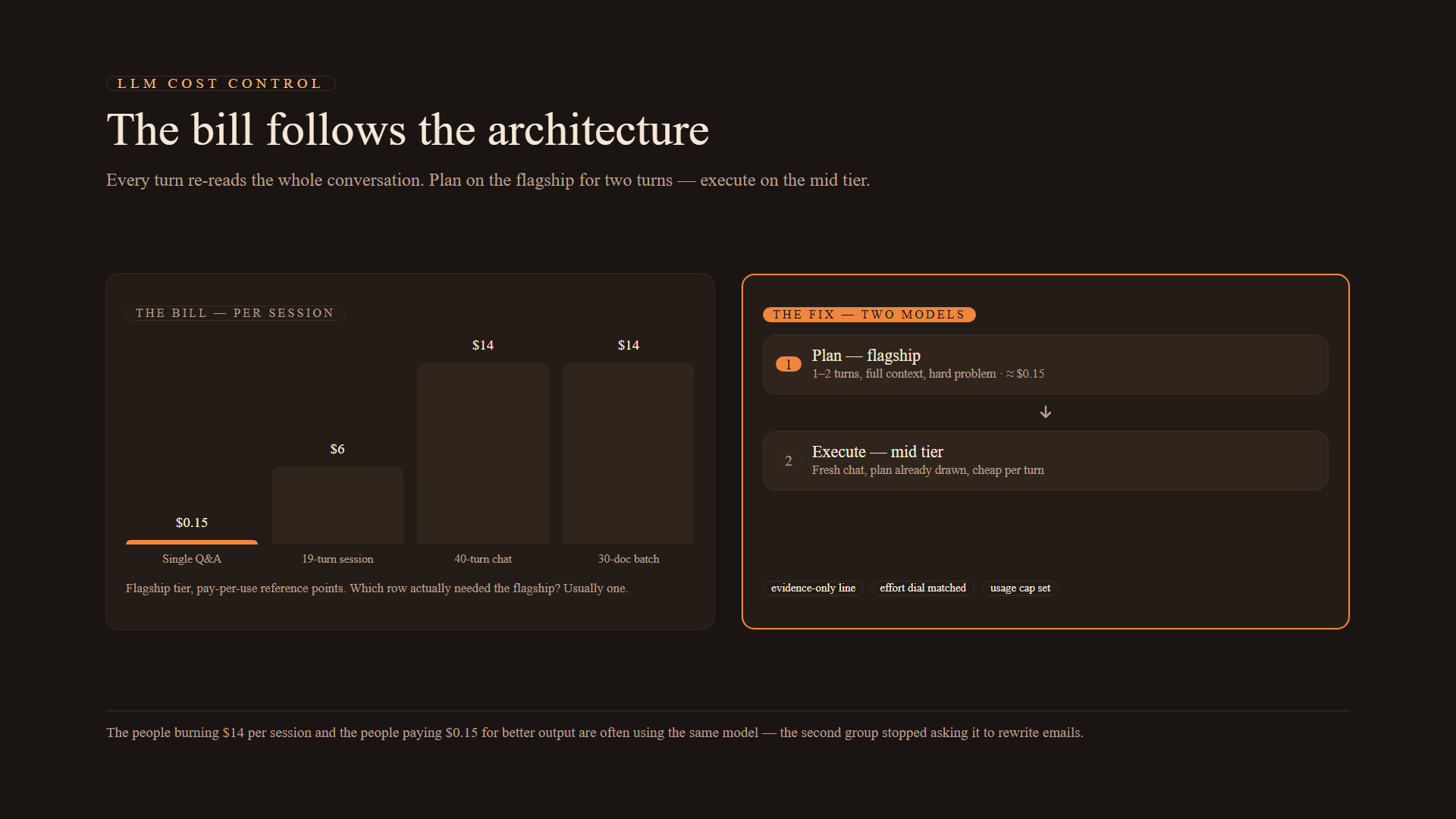
| Session pattern | Typical turns | Ballpark cost | What you paid for |
|---|---|---|---|
| Single question, single answer | 1–2 | ~$0.15 | One focused answer |
| Working session, medium thread | ~19 | ~$6 | Strategy plus refinement |
| Long open-ended chat | ~40 | ~$14+ | A lot of re-reading |
| Batch job (30 documents) | 1 shot | ~$14 | Real throughput |
Industry tracking shows the same shape from the other direction: budget-tier and flagship models can differ by roughly 16× in multi-turn cost, almost entirely because of context re-reading. In agentic workflows where tool calls stack up, one analysis put the all-in cost of producing a million final output tokens near $200 once every intermediate turn counts.
Now read the table again with one question: which rows actually needed the flagship? Usually exactly one of them.
The two-model workflow: plan expensive, execute cheap
The pattern that separates people who get value from people who get invoices:
- Plan on the frontier model — one or two turns. Set strategy, pressure-test a plan, or structure a hard problem. Give it full context up front.
- Execute on a cheaper tier — fresh session. Open a new chat on the mid-tier model that's included in your subscription and let it do the follow-through.
Think of it like a construction project. You pay the senior architect for one afternoon to draw the structural plan. You don't pay the architect's hourly rate to hammer every nail. A mid-tier model is a perfectly good crew — fast, cheap, and steady, with the plan already drawn.
Model ladders now run from a fast lightweight tier (Haiku-class) through a balanced middle tier (Sonnet-class) to the heavy tiers (Opus-class, and above it the newest flagship with its own named releases). Routing cheap models for routine turns and calling the expensive one only for the genuinely hard step is standard practice in production systems — nothing stops you from running the same architecture on your own desk with two browser tabs.
Two habits make it stick:
- Start a new chat per task. A thread carrying four unrelated jobs pays to re-read all of them, every turn.
- Set a usage cap in your account settings before you experiment — not after the bill lands.
Four prompting rules that pull real work out of a smart model
A smarter model changes how you should prompt it. Each rule exists because the failure it prevents actually happens.
1. Lead with the outcome
First sentence answers "what happened" or "what I need." Details come after. The model spends its reasoning budget on your substance instead of excavating your intent.
2. Demand evidence, not confidence
Add one line to your prompt:
Only report work backed by evidence; flag anything unverified.
Frontier models want to please you, and an unguarded model will hand you a confident "all done!" covering work it never finished. Guidance from the model's own maker says this single line nearly eliminates inflated completion reports. One line — keep it.
3. Separate advising from acting
Tell the model which mode it's in:
I'm thinking out loud — react to this, don't execute anything.
and, for the other job:
Handle this end-to-end. Check with me only before anything irreversible.
These are different jobs. Without the label, you get cautious half-execution or unsolicited opinions, depending on the model's mood.
4. Tell it to act when it knows enough
Smart models can spiral into clarifying questions forever. Instruct it:
When you have enough information to proceed, act, and give me a
recommendation rather than a menu. Flag anything irreversible before
executing it.
A recommendation you can veto is worth more than five options you have to adjudicate.
Four prompt patterns worth stealing
These exploit what the frontier tier is genuinely better at: judgment, adversarial review, and long-horizon structure.
- The decision stress test. Give the model a big decision, your options, ranked priorities, and a deadline. Have it interview you, then return: a one-sentence bottom-line recommendation, bear/base/bull scenarios, the strongest argument for the option it rejected, and the way its own recommendation could be wrong. The rejected-option section is the part worth paying for — you already knew the case for your favorite.
- Adversarial research. Ask for a report that opens with a three-sentence answer, cites every claim, and flags where sources disagree. Then a second pass: attack your three most load-bearing conclusions. Keep it under two pages or it becomes wallpaper.
- Archive to argument. Dump raw notes, transcripts, or journal entries. The model surfaces tensions you stopped noticing, proposes three genuinely different arguments from the same material, then stops and waits for you to pick before drafting anything. It should flag assertions the source material doesn't support — and never put quotes in your mouth.
- The operating review. Paste a week of scattered notes, threads, and to-dos. Get back four sections: commitments (overdue ones flagged), decisions made vs. things merely discussed, conflicts quoted from both sides, and five next-week actions traceable to source material. If a line can't be pinned to your raw notes, it gets cut.
Context is the other half of the bill
A model trained on everyone answers as everyone — generic, median, safe. What drags it from "everyone" to "you" is context, and you have three cheap ways to persist it:
- An about-me document you paste into new sessions: your work, constraints, audience, and voice.
- Projects — folders with standing instructions and reference files so instructions survive between sessions.
- Saved skills — anything you've explained to the model twice becomes a named, reusable command. Anything you repeat is a leak.
Connectors (email, chat, meeting notes, docs, spreadsheets) can pull context in directly — minutes of setup to remove the copy-paste tax from every session afterward. One honest warning: run your prompt-improvement chores on the mid tier, not the flagship. You don't need the architect to sharpen pencils.
Effort settings are a cost dial, too
Current models expose an effort level — low, default, high, and above. More thinking costs more credits, every time:
- A big, hard, one-shot objective earns maximum effort.
- Small incremental edits on something already drafted earn the minimum.
Defaulting everything to high is the subscription version of leaving every light in the house on.
Cost-control checklist
Run this before your next frontier session:
- Is this actually a goal, or a task I should hand to the mid tier?
- Can the session finish in one or two turns if I front-load context?
- Did I start a fresh chat instead of reusing a crowded thread?
- Did I include the evidence-only line?
- Is the effort setting matched to the job's difficulty?
- Is there a usage cap on the account?
- Did the strategy phase end, so execution can move to the cheaper model?
Frontier models are not expensive because you use them. They're expensive when you use them for everything. Give the top tier one hard problem, two turns, and full context. Let a cheap tier do the follow-through. Ask for evidence, not enthusiasm, and make your judgment calls explicit.
The people burning $14 per working session and the people paying $0.15 for better output are often using the same model. The difference is that the second group stopped asking it to rewrite emails.