Choosing the Right AI Tools for Advanced Automation: Claude vs. ChatGPT Codex
Picking an AI assistant used to be a writing contest. Better poems, cleaner summaries, sharper code. That era is over. The real question now is which tool can do things: browse websites, click through your desktop apps, run jobs on a schedule, and fix its own mistakes without you hovering. On that scoreboard, Anthropic's Claude and OpenAI's Codex platform are the two heavyweight ecosystems — and they play very differently.
This guide is not another feature list. It's a decision framework: figure out what your workflow actually needs, then see which environment delivers it with the least friction.
Quick Answer
Pick based on your workflow's priority, not on benchmark scores. If you need one workspace that combines web browsing, computer interaction, and scheduled tasks, ChatGPT Codex is the stronger all-in-one. If your work is complex creative writing, nuanced text, or tasks on strict platforms like LinkedIn, Claude is often the steadier choice — and most power users keep both.
Key Takeaways
- Unified wins for automation: Codex bundles browser, files, and scheduled jobs in one workspace, which cuts context switching.
- Judgment wins for Claude: Claude stays strong for complex media, nuanced writing, and high-sensitivity platforms where strict filters cause other agents to hesitate.
- Deterministic goes to n8n: If a task leaves no room for judgment calls, a fixed automation tool beats any LLM.
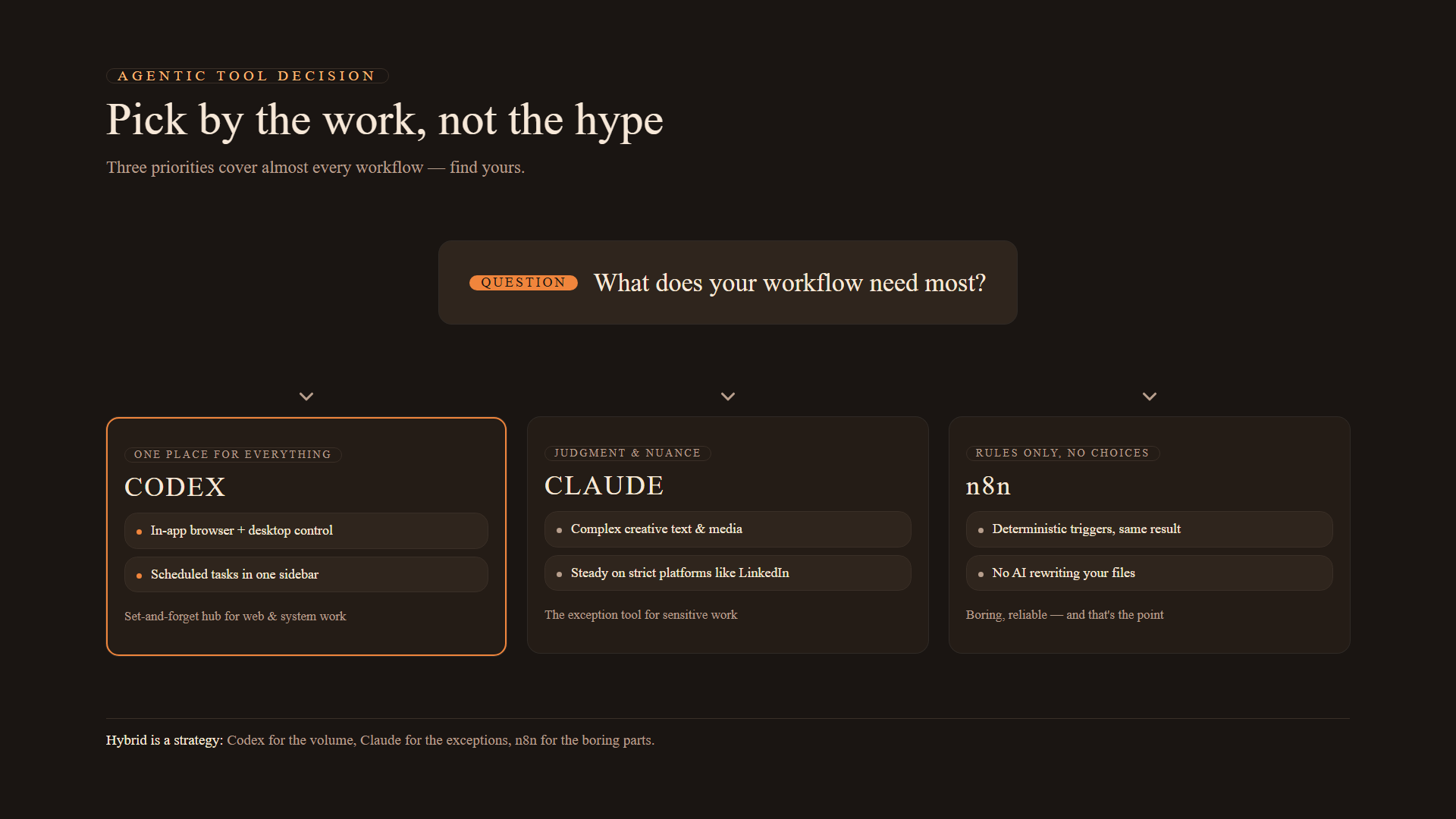
- Hybrid is a strategy, not a failure: Use Codex for the volume work, Claude for the exceptions, n8n for the boring parts.
Start with the Job, Not the Logo
The mistake most people make is asking "which AI is better?" The better question is: "what does my workflow need most?" Three priorities cover almost every case:
| Your priority | Best fit | Why |
|---|---|---|
| One place for web, desktop, and schedules | Codex | Built-in browser + computer use + scheduled tasks in a single sidebar |
| Complex creative text or strict-platform work | Claude | High nuance, consistent behavior on sensitive platforms, strong extensions |
| Zero-error, rule-based repetition | n8n | Deterministic triggers — no "judgment calls," no rewriting your files |
If two rows describe you, that's normal. Most people end up running a hybrid.
When a Unified Workspace Actually Matters
"Unified workspace" sounds like marketing, but it maps to a real cost: context switching. Every time you bounce between an AI chat, a browser tab, and a scheduling tool, you lose momentum — and so does the AI, because its context fragments.
Consider a genuinely useful daily task:
- Log into a vendor portal (no API available).
- Pull the entries that match your criteria from the database.
- Send a formatted summary to your team in Slack.
On Codex, that's one scheduled task in one sidebar: the browser logs in, the script filters, the notification goes out. On a fragmented setup, you're stitching together a browser extension, a cron job, and a webhook — and each seam is a place where a step silently drops.
Web Interaction: Built-In Browser vs. Extensions
How the built-in browsers compare
Codex ships a native browser inside the workspace. The AI opens pages, reads them, clicks buttons, and carries the session state forward — no copy-paste, no tab management. That's a decisive advantage for research without APIs, like scraping competitor pricing across sites that block automation-friendly access.
Claude reaches the same goals through extensions and third-party integrations. Those work, but they add layers: install, configure, maintain. Each layer is a small tax you pay every time the site changes its markup.
Computer Use: the "smoother" gap
Computer Use is the AI operating your desktop — moving the mouse, typing, clicking inside approved applications. Both platforms have explored it; in practice, Codex's execution is generally smoother across approved desktop apps, with fewer pauses where the model "decides" whether it's allowed to continue. That matters for workflows that shuttle data between desktop tools all day.
Set and Forget: Routines vs. Scheduled Tasks
Both ecosystems let you automate on a timer — but they sit at different depths in the stack:
- Claude Routines are typically wired through integrations or extensions. Powerful, but they inherit the fragility of the extension they ride on.
- Codex Scheduled Tasks live in the core dashboard as background processes, right next to the browser and file tools that most automation needs anyway.
Because the pieces are bundled, the failure modes shrink: session state persists, login stays warm, and the "missing a step" risk drops. For non-technical users this is the difference between "an automation I trust" and "an automation I babysit."
Media and Safety Nets
Integrated image generation
If you produce social graphics, mockups, or ad creative, image generation inside the chat matters. Codex creates and edits images in the same thread where you discuss them — request a change, see it, repeat — without leaving the workspace. Claude has excellent vision (it can read images deeply), but creation and iteration aren't native to the same flow. For volume creative work, that seam adds up.
Git as a save-point
Git sounds like a developer tool, but for AI work it's a safety net: a history of every change, with a visual diff of what the agent did before you accept it. Codex wraps this in a non-technical interface, which is exactly what you want when an agent edits files — the ability to see the change and revert before it becomes permanent.
# What a typical agent-generated change looks like under the hood
git diff            # review what the AI changed
git checkout -- .   # undo it entirely if the change is wrong
git commit -m "accepted agent change"   # save the good version
Non-programmers don't need to type these commands in Codex — the workspace shows the diff and the buttons. But knowing what Git is doing under the hood is what turns it from scary into reassuring.
Where Claude Still Holds the Line
Codex wins most automation categories, but Claude still wins specific ones:
- Strict-platform behavior. On platforms with aggressive security filters — recruitment on LinkedIn, certain HR systems — fully autonomous agents get flagged. Claude plus a browser extension navigates those guardrails more reliably, because it hesitates more gracefully and respects platform rules the agent might barrel through.
- Complex creative text and media. For long-form nuance, personality-heavy copy, or careful vision work, Claude's output quality remains the benchmark.
- Corporate guardrail environments. If your compliance team needs to know exactly what the AI is allowed to touch, Claude's stricter posture is a feature, not a bug.
Transitioning from Claude to Codex — Without Breaking Anything
If the automation side of your stack is moving to Codex, the migration is structured:
-
Import. OpenAI provides import tooling that brings project structures and chat history from the Claude ecosystem into Codex.
-
Map your skills. Skills are instruction packages — writing style, safety rules, task procedures:
- Claude keeps them in
.claude/skills - Codex expects them in
.agents/skills
Each skill folder should contain a
SKILL.mdfile defining the rules for that task. - Claude keeps them in
-
Recreate schedules. Recurring tasks don't migrate automatically; re-enter them in the Scheduled Tasks sidebar.
-
Run a known task. Before you trust the new home, execute one task you've run a hundred times and verify the output still matches your rules.
-
Keep both for 1–2 weeks. Parallel-running is the cheapest insurance you'll ever buy.
// A skill file is just rules in markdown — here's the shape
{
  "skill": "weekly-report",
  "rules": [
    "Summarize in plain English, no hype",
    "Lead with the number that changed",
    "Flag anything requiring human judgment"
  ]
}
Frequently Asked Questions
Does moving my data to Codex delete my Claude account?
No. Importing copies your setup into the new environment; it leaves the source account intact. Run both in parallel for 1–2 weeks, then decide.
What's the difference between a Routine and a Scheduled Task?
In this context: Claude's Routines are typically handled through specific integrations or extensions, while Codex Scheduled Tasks run as built-in background processes in the core dashboard — with the browser and file tools the task usually needs sitting right next to them.
When should I use n8n instead of an AI agent?
When the task is deterministic — a rule that never needs judgment. Moving a file from Folder A to Folder B, sending a webhook when a row is added, retrying an API call on failure. A fixed automation tool like n8n executes the same way every single time; an LLM might occasionally "improve" your file while moving it. If the spec is fully knowable, don't pay for judgment you don't need.
Which tool should I keep if I can only afford one?
It depends on your bottleneck: if your day is eaten by repetitive web work, Codex pays for itself in recovered hours. If your output is the writing — long-form content, nuanced correspondence — Claude is the better spend. If your bottleneck is neither, the cheapest fix is n8n on a $5 server, not a new AI subscription.
Final Thoughts
The Claude-vs-Codex decision stops being stressful the moment you stop comparing brands and start comparing jobs. Complex media and nuanced text — Claude, comfortably. Web scraping, desktop interaction, scheduled background tasks — Codex, comfortably. Fixed, rule-based repetition — neither; that's n8n territory. And for most people running real operations, the winning answer is a hybrid: one tool as the hub, the others as specialists, and no loyalty to any of them.